
Software review websites publish a constant stream of app reviews, software comparisons, troubleshooting guides, product updates, and tutorials. Written content remains essential, but many of these articles can also serve as the foundation for useful videos.
The challenge is turning a detailed article into a video that people can understand quickly without losing the technical accuracy that makes a software review trustworthy.
Text-to-video AI tools can help publishers convert written information into short explainers, product introductions, social media clips, and other visual formats. Instead of building every video from scratch, content teams can start with an existing article and refine the generated result.
For software publishers such as DownloadBytes, this approach offers a practical way to extend the value of existing research. The important part is knowing which content to convert, which tools to consider, and where human editing is still necessary.
Why Software Review Websites Are Using Text-to-Video AI

Readers visit software websites for different reasons. Some want to compare two applications before purchasing a subscription. Others need help installing a program, understanding a feature, or fixing a technical problem.
A written guide can answer these questions in detail, while a short video can introduce the main idea or demonstrate a particular step. Offering both formats gives readers more flexibility in how they consume information.
There are several reasons why text-to-video AI is worth considering for technology publishers.
Turn Existing Articles Into Video Content
A software review often contains a clear structure: an introduction, feature descriptions, advantages, disadvantages, and a final recommendation. That structure can be adapted into a video script without starting the research process again.
For example, a 1,500-word application review could become a short overview covering the software’s main purpose, its most useful features, and the type of user who might benefit from it.
The video should not attempt to reproduce every paragraph. Its purpose is to communicate the most important information and direct viewers to the full review when they need more detail.
Publish More Formats Without Expanding the Production Team
Traditional video production can involve scripting, recording, screen capture, voiceovers, editing, and exporting. These steps are manageable for important projects but can become time-consuming when a website publishes new content every day.
AI-assisted production can reduce some of the manual work involved in creating an initial video. Depending on the tool, publishers may be able to generate scenes, add narration, create captions, and arrange visuals from a prepared script.
The output still requires review. However, starting with an editable draft can be more efficient than building the entire project from an empty timeline.
Make Technical Information Easier to Follow
Some software concepts are easier to understand when presented visually. A short animation can introduce a workflow, while a screen recording can show exactly where a setting appears in an application.
The format should match the information being explained. AI-generated visuals may work well for general introductions, but detailed instructions often benefit from genuine screenshots and recordings of the software interface.
Extend the Reach of Existing Content
A single article can support several content formats. A comparison guide might become a short video for social media, a longer explanation embedded in the article, and a brief summary for an email newsletter.
Repurposing content does not guarantee additional traffic or higher search rankings. It does, however, give publishers more opportunities to present useful information to audiences who prefer different formats.
One option to explore is Pollo AI’s Pollo AI text to video generator, which turns scripts, outlines, and blog copy into short videos with far less friction than a traditional editing workflow. For tech publishers, that means a changelog, review, or tutorial can become a visual asset in minutes instead of sitting as text only.
Pollo AI is especially useful when the source material is already organized, because the tool can move from idea to first draft without forcing the team through a blank timeline.
That matters for software coverage because the best articles are usually packed with useful structure already. A feature list, a product comparison, or a setup guide can all be converted into a concise video if the core message is clear. The result is not just more content. It is more formats from the same work.
Best Text-to-Video Use Cases for Software Publishers
Not every article needs a video. The strongest candidates are usually pages that explain a clear problem, introduce a product, or help readers make a specific decision.
1. Software Reviews and Product Roundups
A software review can be converted into a short summary that introduces the product, highlights its strongest features, and explains its main limitations.
For example, a review of a photo editor might focus on its editing tools, ease of use, supported file formats, and suitability for beginners. The video can introduce these points while the complete article provides the detailed testing results.
Publishers should avoid presenting AI-generated product scenes as genuine screenshots. If the video demonstrates an actual application, use verified recordings or images of its interface.
2. Software Tutorials and Troubleshooting Guides
Tutorials are particularly useful candidates for video because readers often want to see each step rather than interpret written instructions alone.
A guide about changing application settings could become a short walkthrough with numbered steps, narration, and on-screen annotations.
For accuracy, record the actual software interface whenever possible. AI-generated scenes can support the introduction, but they should not replace real demonstrations when viewers need to follow precise instructions.
3. New Application Announcements
A new app announcement can become a launch video that introduces the application’s purpose, intended audience, and notable features.
These videos can be published alongside a full article, provided that the claims are checked against reliable product documentation.
Avoid announcing features, compatibility details, or release dates that have not been confirmed.
4. Software Comparisons
Comparison articles often contain more information than a short video can reasonably cover. Instead of summarizing every feature, focus on the factors most likely to influence a reader’s decision.
A video comparing two image editors, for instance, might explain their differences in pricing, ease of use, editing capabilities, and operating system support.
The full article can retain the detailed comparison table, limitations, and testing methodology.
If the source article covers five features, the video should not try to explain all five equally. Pick the strongest angle, build the clip around that, and let the article carry the extra detail.
5. Quick Software Tips for Social Media
Short tips can introduce a single useful feature, keyboard shortcut, or configuration change. These clips are easier to follow when they solve one clearly defined problem.
For instance, a 30-second video could explain where to find a particular export setting or how to enable a useful application feature.
Keep the instructions specific, verify the steps, and provide a link to the full guide when the subject requires additional explanation.
Where InVideo AI Fits Into a Software Video Workflow
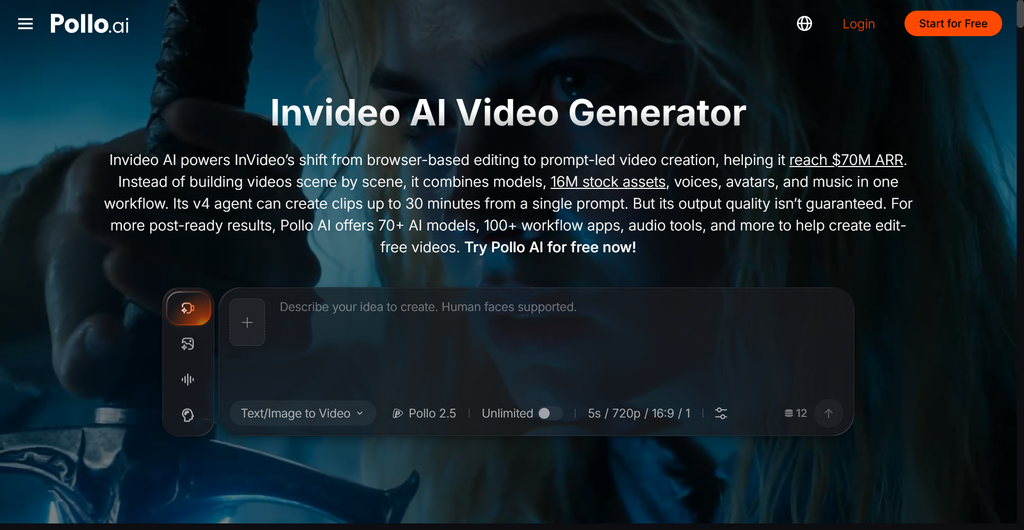
Different video tools suit different production requirements. Some prioritize prompt-based generation, while others provide more structured editing workflows with templates, narration, and scene organization.
Another option worth evaluating is InVideo AI. It can serve as a starting point for creating scripted videos, explainers, promotional content, and other projects where a guided workflow is useful.
For software review publishers, the main consideration is not how many effects a tool offers. It is whether the platform can turn accurate source material into a clear, editable video with a reasonable amount of manual work.
Before choosing a tool, evaluate the following:
- Script handling: Can it work with your prepared script without substantially changing technical details?
- Visual selection: Can you replace irrelevant stock footage or generated scenes with genuine product screenshots?
- Editing flexibility: Can you adjust scene order, captions, timing, and narration?
- Export options: Does the available plan support your required resolution, aspect ratio, and publishing format?
- Commercial terms: Do the current licensing conditions cover your intended use?
- Total cost: Does the time saved justify the subscription and any additional editing work?
Features, pricing, usage limits, and licensing conditions can change. Check the current product documentation before making a purchasing decision.
Pollo AI vs. InVideo AI: Which Should You Evaluate?
The most suitable choice depends on the type of video you want to create and how much control you need over the final result.
| Evaluation factor | Pollo AI | InVideo AI |
|---|---|---|
| Initial video creation | Useful to evaluate for prompt-based generation | Useful to evaluate for script-led video workflows |
| Visual approach | Depends on the selected generation tools and settings | Depends on the selected workflow, templates, and editing options |
| Software tutorials | Add verified screen recordings where necessary | Add verified screen recordings where necessary |
| Editing requirements | Review and refine generated scenes | Review and refine generated scenes |
| Best selection method | Test with your actual article and script | Test with your actual article and script |
This is a practical evaluation framework rather than a claim that one platform is universally better. Compare both tools using the same source article, target video length, and quality requirements before deciding which one fits your publishing process.
How to Turn a Software Article Into a Video
A repeatable workflow makes it easier to produce videos consistently without compromising the quality of the original article.
Step 1: Choose an Article With a Clear Purpose
Start with a page that answers one specific question or helps readers make a decision. A focused tutorial or software review is usually easier to adapt than a broad article covering several unrelated subjects.
Identify the main takeaway before writing the video script.
Ask yourself: What should viewers understand after watching this video?
Step 2: Write a Short, Accurate Script
Do not paste the entire article into a video generator and expect the result to work as a concise explanation.
Instead, create a script with four basic elements:
- Opening: Introduce the problem or product.
- Main explanation: Present the most important facts or steps.
- Practical detail: Include a relevant example or demonstration.
- Next step: Direct viewers to the complete guide if they need more information.
For a short software review, aim for a focused script that can be spoken comfortably within the chosen duration. Read it aloud and remove unnecessary repetition before generating the video.
Step 3: Generate an Initial Video Draft
Use your script to create the first version. Select an appropriate aspect ratio, visual style, narration option, and target duration for the intended platform.
Review the draft instead of assuming the generated scenes will accurately represent the product.
Pay particular attention to software names, interface labels, technical terminology, and any on-screen text.
Step 4: Add Real Software Screenshots and Recordings
This is one of the most important steps for technology publishers.
AI-generated footage can look polished while showing an interface or feature that does not exist. Genuine screenshots and screen recordings help demonstrate what the software actually does.
Use original recordings whenever possible, and ensure that the version shown matches the instructions in the article. Remove personal information, account details, and confidential data before publishing.
Step 5: Edit the Video for Clarity
Check the narration, captions, transitions, pacing, and scene order. Remove visual elements that do not support the explanation.
Captions should be readable on mobile devices. The opening should establish the subject quickly, and technical instructions should remain on screen long enough for viewers to understand them.
Do not add dramatic effects merely to make a software tutorial look more entertaining. Clarity is more important than visual complexity.
Step 6: Verify Every Important Claim
Compare the final video against the original article and authoritative product documentation.
Confirm that:
- Product names and features are correct.
- Pricing and compatibility details are current.
- Demonstrated steps match the real interface.
- The narration does not introduce unsupported claims.
- Screenshots and other assets are suitable for publication.
- Music, footage, and voice assets are used within their licensing terms.
Correct any discrepancies before publishing the video.
Step 7: Publish and Measure Performance
Embed the video in the relevant article when it adds useful context. You can also prepare shorter versions for social platforms or newsletters.
Measure results against the video’s purpose. Useful indicators may include video completion rate, engagement, clicks to the full guide, and the number of viewers who continue to relevant pages.
Compare results over time rather than assuming that adding a video will automatically improve search performance.
Text-to-Video AI vs. Traditional Video Production
Software websites can use AI generation, traditional production, or a combination of both. The right approach depends on the complexity of the subject, available resources, and the level of accuracy required.
| Factor | Text-to-video AI | Traditional production |
|---|---|---|
| Initial production speed | Often faster for simple concepts | Usually requires more preparation |
| Production costs | May reduce some manual work | Can require more equipment and editing resources |
| Technical accuracy | Requires human verification | Direct recording offers greater control over demonstrations |
| Creative control | Depends on the tool and editing options | Typically offers detailed control |
| Simple explainers | Often suitable | Suitable |
| Social media clips | Often suitable | Suitable |
| Complex software tutorials | May need substantial manual editing | Often better suited to detailed demonstrations |
| Brand consistency | Requires careful review | Can be controlled through a defined production process |
Production Speed and Cost
AI tools can shorten the time needed to produce a first draft, particularly when the script is already prepared.
However, the total production cost includes more than the tool subscription. Publishers should also account for script preparation, editing, fact-checking, revisions, and the time needed to replace unsuitable visuals.
Traditional production may take longer, but it can be a better investment when the video requires precise demonstrations or a distinctive visual style.
Customization and Editorial Control
Traditional editing generally provides direct control over recorded footage, timing, transitions, and visual presentation.
AI-assisted tools can automate parts of the process, although the amount of control varies by platform. Some generated scenes may need to be replaced or edited extensively before they are suitable for publication.
Which Approach Works Best for Software Tutorials?
For a general introduction to a software category, AI-generated visuals may be sufficient when they are clearly illustrative and do not misrepresent the product.
For instructions involving real buttons, menus, settings, or error messages, genuine screen recordings are usually more dependable.
The same principle applies to troubleshooting content: the viewer needs to see the steps that actually work, not an approximation of the interface.
Why a Hybrid Workflow Is Often Practical
Software publishers do not need to choose between complete automation and entirely manual production.
A balanced workflow can combine the speed of AI with the accuracy of direct recording:
Article → Script → AI-generated draft → Real software screenshots or screen recording → Human editing → Fact-checking → Publication
This approach allows teams to automate suitable production tasks while retaining editorial control over the information readers rely on.
Pros and Cons of Text-to-Video AI for Software Websites
Advantages
- Faster first drafts: A prepared script can provide a starting point without requiring every scene to be assembled manually.
- Content repurposing: Existing reviews and tutorials can support additional video formats.
- Flexible production: Short explainers can be adapted for different platforms and audiences.
- Lower production barriers: Small publishing teams can experiment with video without building a complete in-house studio.
- Repeatable workflows: Templates and established review processes can make routine video production easier to manage.
Limitations
- Possible factual errors: Generated narration or visuals may misrepresent software features.
- Limited interface accuracy: AI-generated screens should not be treated as proof that a product works in a particular way.
- Editing is still necessary: Poor pacing, irrelevant scenes, and inaccurate captions can undermine the finished result.
- Recurring costs: Subscription fees, usage limits, and additional editing requirements may affect the overall budget.
- Generic presentation: Relying on default templates can make different videos look too similar.
- Licensing considerations: Publishers must verify the rights and restrictions associated with generated assets, music, voices, and footage.
The strongest reason to use text-to-video AI is to reduce repetitive production work, not to remove human responsibility for accuracy.
A Practical Quality Checklist Before Publishing
Use this checklist for every AI-assisted software video.
- The video addresses one clear reader question.
- The script is based on a reviewed article or reliable documentation.
- Software names, features, and technical details are correct.
- Real interface demonstrations are used wherever precision matters.
- Captions and narration have been checked for errors.
- Visuals support the explanation instead of distracting from it.
- Copyright and commercial-use requirements have been reviewed.
- The video complements the article rather than repeating it without adding value.
- The article and video contain consistent information.
- Performance will be evaluated using relevant audience metrics.
Conclusion: Use AI to Improve the Workflow, Not Replace Editorial Judgment
Text-to-video AI gives software publishers another way to present information they have already researched and written. Reviews can become short product summaries, tutorials can include visual walkthroughs, and comparison articles can support concise videos for readers who want the main differences explained quickly.
The best results come from a clear script, an appropriate video tool, authentic product visuals, and careful human review. Pollo AI and InVideo AI are two options publishers can evaluate, but the final choice should depend on the actual quality of their output and the time required to make it publishable.
For DownloadBytes and other technology websites, the long-term opportunity is not simply to produce more videos. It is to help readers understand software more easily while maintaining the accuracy, transparency, and practical detail that make a review worth reading.

Leave a Reply